- Room 525,Building 7D,Hengda Shishang Huigu,Dalang Street,Longhua District,Shenzhen,China,518109

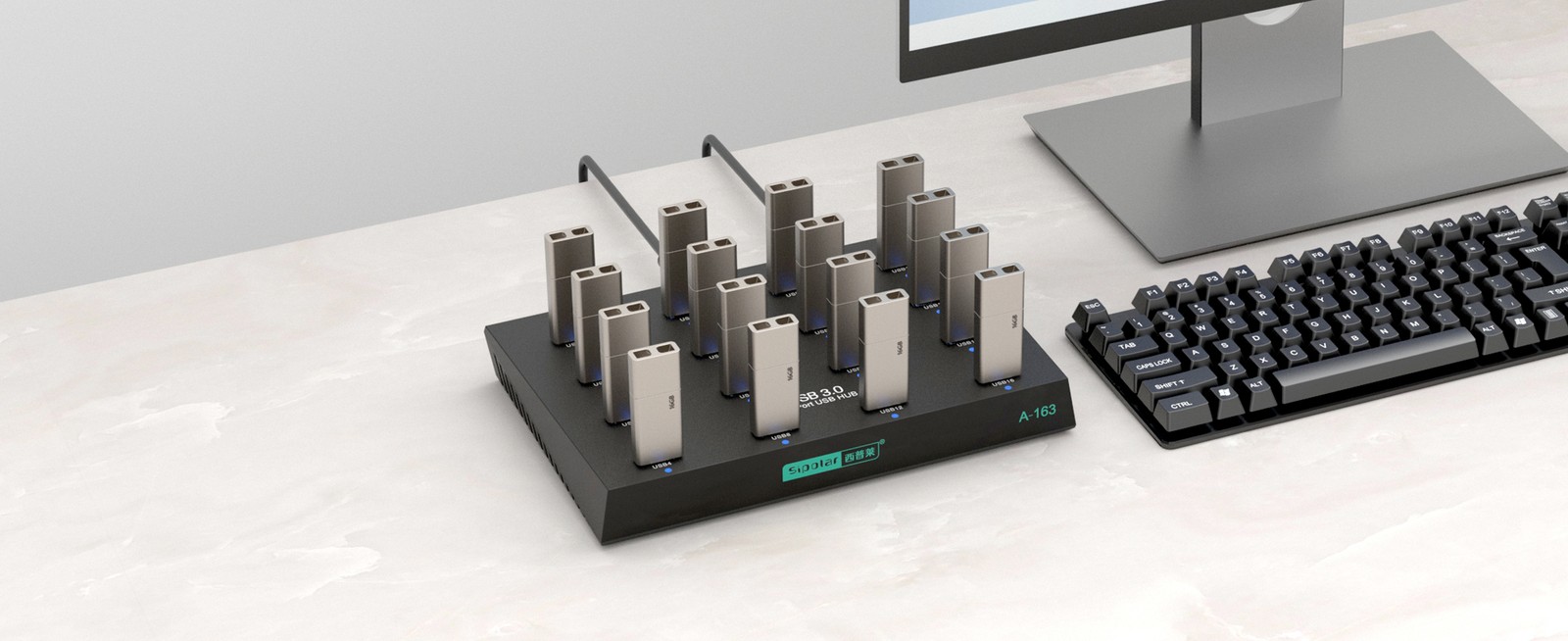
Forty USB drives waiting to be flashed is not an unusual situation on a production line. It is also not a situation a single workstation was designed for.
The bottleneck is rarely the flashing software. It is the number of USB ports on the host, and what happens to those ports when you fill every one of them with a drive that draws current at the same instant.
This guide walks through the port arithmetic for 16, 32, and 64 device batches, the bandwidth question that gets misunderstood more often than any other, and the power budget that decides whether a batch run stays stable or starts dropping devices halfway through.
A production line running four USB drives per station needs four ports. Running sixteen drives per station needs sixteen. The relationship is arithmetic, and it is worth writing down before choosing hardware.
What makes it less simple is that plugging sixteen drives into a hub is not the same as plugging sixteen drives into sixteen separate host ports. Two things change: the current available to each port, and the bandwidth each port can actually use.
Both of those have numbers, and both of them are frequently quoted in a way that does not survive contact with a busy production floor.
Two failure modes show up repeatedly in mass production.
Power is the first suspect. A bus-powered hub draws its current from the host USB port. USB 2.0 specifies 100mA for a low-power device and 500mA for a high-power device on a single port. A bus-powered hub already consumes one of those allocations before it powers anything downstream. Fill the remaining ports and the budget is gone, and devices drop during enumeration or under inrush current when a drive spins up.
Cascade depth is the second. The USB 2.0 specification permits up to 5 levels of cascade. Staying inside that limit is not sufficient on its own. A long chain — A to B to C to D — attenuates the signal at every hop, and the retry rate climbs. The specification's own guidance is to hang multiple hubs off the same parent wherever possible, which produces a tree rather than a chain.
Shared uplink is the third. Every device behind a hub shares the single uplink link back to the host. Thirty drives copying simultaneously are thirty devices drawing from one link. The copy jobs are small, but the concurrency is not, and the queue stalls in a way that looks like a software problem.
The fix is structural: give each hub its own power supply, keep the topology to two levels, and understand that bandwidth is a shared resource before you commit to a batch size.
Four models cover the common production volumes.
| Model | Ports | Rate | Power input | Max current per port | Total power | Enclosure |
|---|---|---|---|---|---|---|
| A-100 | 16 × USB-A 2.0 | 480Mbps | DC 5V/3A | 5V/300mA | ≤15W | ABS+PC plastic |
| A-163 | 16 × USB-A 3.0 | 5Gbps | DC 5V/5A | 5V/500mA | ≤25W | ABS+PC plastic |
| A-321 | 32 × USB-A 2.0 | 480Mbps | DC 5V/5A | 5V/500mA | — | ABS+PC plastic |
| PC-3201 | 32 × USB 2.0 test ports | 480Mbps | 100-240VAC internal | — | — | Cold-rolled steel, 1U |
| PC-6401 | 64 × USB 2.0 test ports | 480Mbps | 100-240VAC internal | — | — | Cold-rolled steel, 1U |
Two things stand out in that table.
The PC-3201 and PC-6401 are not hubs with a host attached. They are all-in-one production test machines. The PC is inside the chassis, the USB ports are on the front panel, and the operator plugs drives directly into the machine. There is no host PC to configure, no second machine to keep in sync, and the whole station occupies one rack slot.
The A-321 has a wiring requirement that catches people out. It is a dual-power, dual-cable design. Two upstream data cables, each responsible for 16 of the 32 ports, and both must be connected to the host. Leave one cable out and the system enumerates half the drives — the other sixteen simply do not appear.
Same port count, same physical dimensions, different data rate.
The A-100 is specced for the small loads in this workflow. Write firmware, partition, format, and copy a few files onto a drive: the data volume is modest, and a bare flash PCB draws on the order of a hundred milliamps.
| Item | A-100 |
|---|---|
| Downstream ports | 16 × USB-A 2.0 |
| Transfer rate | 480Mbps |
| Power input | DC 5V/3A |
| Maximum current per port | 5V/300mA |
| Total power | ≤15W |
| Dimensions | 188.8 × 127.6 × 27.3mm |
| Enclosure | ABS+PC plastic |
The A-163 is the USB 3.0 version at the same size: 10 × USB-A 3.0 downstream ports, 5Gbps, DC 5V/5A, 5V/500mA per port, ≤25W total. If the batch involves moving large files onto each drive, the difference between 2.0 and 3.0 is not subtle.
The selection rule is one question. Are the files you are copying small or large?
Same family as the A-300, one size up. DC 5V/5A input, 5V/500mA per port, 274 × 113 × 23.8mm, ABS+PC enclosure.
As noted above, both upstream cables must be connected.
When the host PC is part of the problem — because it sits on the bench taking up space, or because it needs to be reconfigured for every batch — the all-in-one machine removes it from the equation.
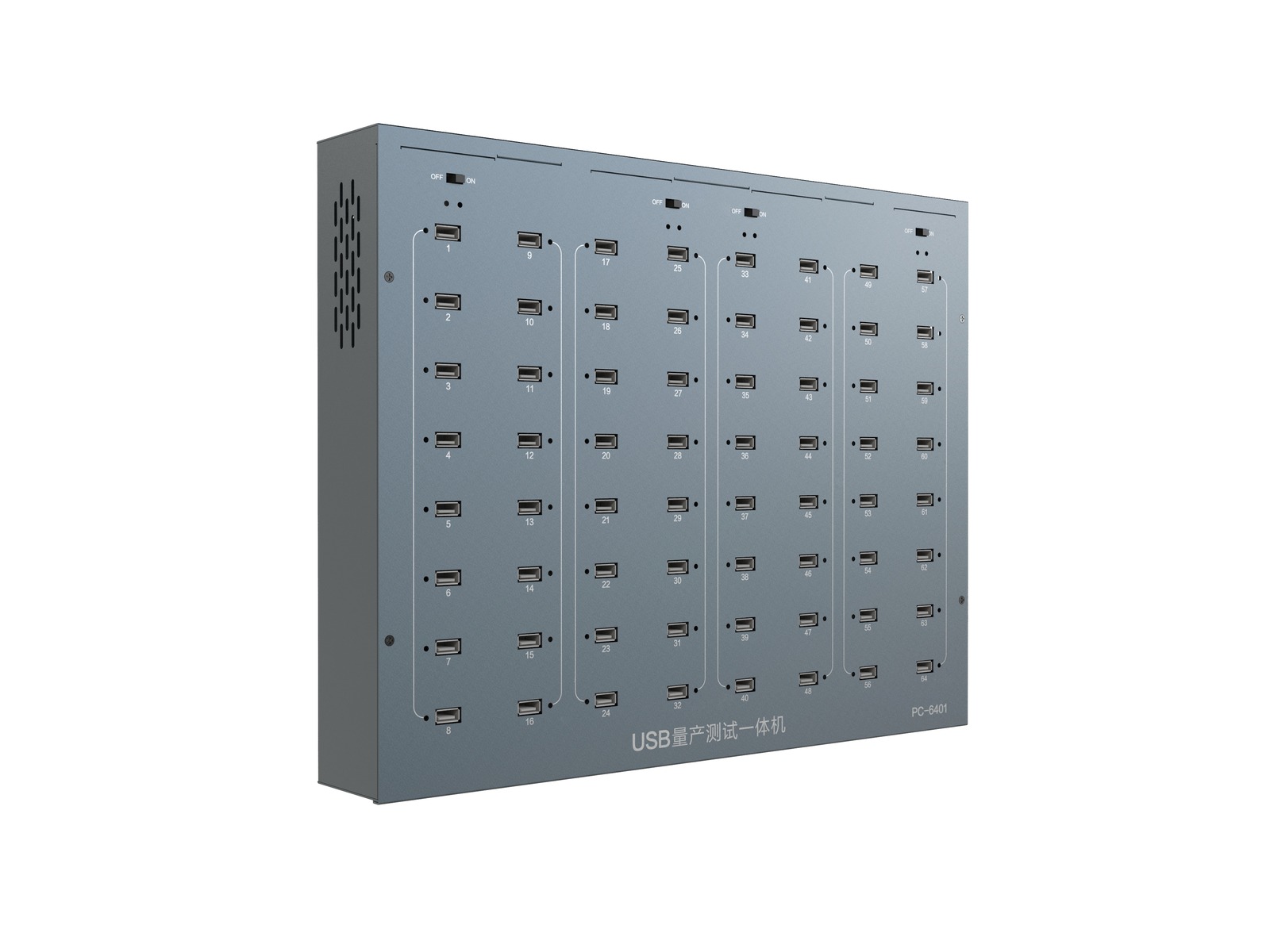
The PC-3201 provides 32 test ports and the PC-6401 provides 64. Both use USB 2.0 at 480Mbps, fully backward compatible with USB 1.1 and USB 1.0 devices, so older drives can still be tested.
Both run a 1U rackmount chassis in cold-rolled steel with sliding rail retention.
Each test port has its own indicator LED. A port with a drive enumerated and running shows green; a port that has hit an over-current or short shows red. On a 64-port machine that difference matters — you can identify the failing position without unplugging drives one at a time.
The PC-6401 also carries eight groups of independent OFF/ON toggle switches on the top panel. A group that has locked up can be power-cycled on its own, without stopping the rest of the batch. On a 64-port run, restarting the entire machine means restarting the entire run.
Both machines ship with the data cables already counted: 32 cables with the PC-3201, 64 with the PC-6401.
This is the part most often misquoted.
When sixteen drives are connected to a 16-port hub and all sixteen copy at once, it looks like sixteen parallel operations. It is not. Those sixteen devices share one uplink link back to the host.
For the A-100 and A-321, that uplink is USB 2.0 at a theoretical 480Mbps. The A-300 spec sheet states 48Mbps per port, which is the practical per-port figure once protocol overhead and shared access are accounted for. Sixteen ports do not each get 48Mbps.
The A-163 changes this. Its uplink is USB 3.0 at 5Gbps, and sixteen devices sharing that link receive roughly ten times what a single port would get over USB 2.0.
For batch formatting and small-file copying, bandwidth is rarely the constraint. The devices are small and the work is short. For moving hundreds of megabytes onto each drive, the difference between a 2.0 and a 3.0 model is immediate and obvious.
So the practical rule: choose on port count first, then upgrade to 3.0 only if the payload per drive justifies it.
Two numbers on the spec sheet, and they answer different questions.
Maximum current per port describes what that single port can deliver on its own.
Total power describes the budget shared by all ports.
Worked example. Sixteen A-100 ports at the 5V/300mA per-port maximum would need 24W, which exceeds the ≤15W total. That does not disqualify the model — it means sixteen drives drawing maximum current simultaneously exceeds what the standard supply provides, and the response is a larger adapter, not a different product.
The A-163 handles the full load within its standard supply: sixteen ports at 5V/500mA needs 40W, and the model carries a ≤25W rating with a 5V/5A input, so the realistic working load sits comfortably inside it.
This is also where the internal power supply on the PC-3201 and PC-6401 earns its place. A rack-mounted test machine pulling mains power directly does not depend on the host PC's USB supply staying healthy under load.
One more point on disk-class loads. The A-100's 5V/300mA per port is sized for flash storage and card readers. It is not sized for mechanical hard drives, whose startup current far exceeds their running current. Seven mechanical disks spinning up simultaneously is a common cause of dropped ports. If the batch involves disk-class devices, use a model with a higher per-port budget and check the total against the adapter.
Hardware solves the connection. What happens after the connection is determined by the tools on the workstation.
Batch formatting needs a formatting tool that supports concurrent operations across multiple devices. Batch copying needs copy software that handles multiple simultaneous read/write streams and retries on failure. Production testing needs an upper-level application that can read the per-port status the machine reports.
All of these exist and all of them support multi-device operation. Running a small batch through the actual toolchain before committing to a full production run is the step that catches configuration problems early.
The instinct when port counts fall short is to buy a bigger hub. Sometimes that is right. Often the better answer is a different topology.
A hub with independent power, a two-level tree structure, and per-port numbering solves three separate problems at once. It removes the bus-powered current ceiling. It keeps signal attenuation to two hops instead of an open-ended chain. And it gives you a ten-port group to search when something needs attention, instead of forty.
For production volumes that exceed what a single hub can carry, the all-in-one test machines take the host PC out of the equation entirely.
Sipolar offers the A-100, A-163, A-321, PC-3201, and PC-6401 for this workflow. Send over your device count, payload size per drive, and the power and temperature conditions on the line, and we will work through the port and current arithmetic with you.
Specifications are subject to the official Sipolar product documentation and the product pages on sipolar.com. This article contains no customer names, customer cases, or on-site information.
Sipolar is a brand of Shenzhen Lpsen Technology Co., Ltd.