- Room 525,Building 7D,Hengda Shishang Huigu,Dalang Street,Longhua District,Shenzhen,China,518109

Printer counts grow faster than people expect.
A finance counter needs four. A document dispatch room needs six. A print centre needs a dozen. Add those small requirements together and a single workstation ends up with forty printers behind it, which is not a number of USB ports any computer ships with.
The usual response is a USB hub. It works up to about ten printers. Past thirty, it does not.
Three mechanisms, and they reinforce each other.
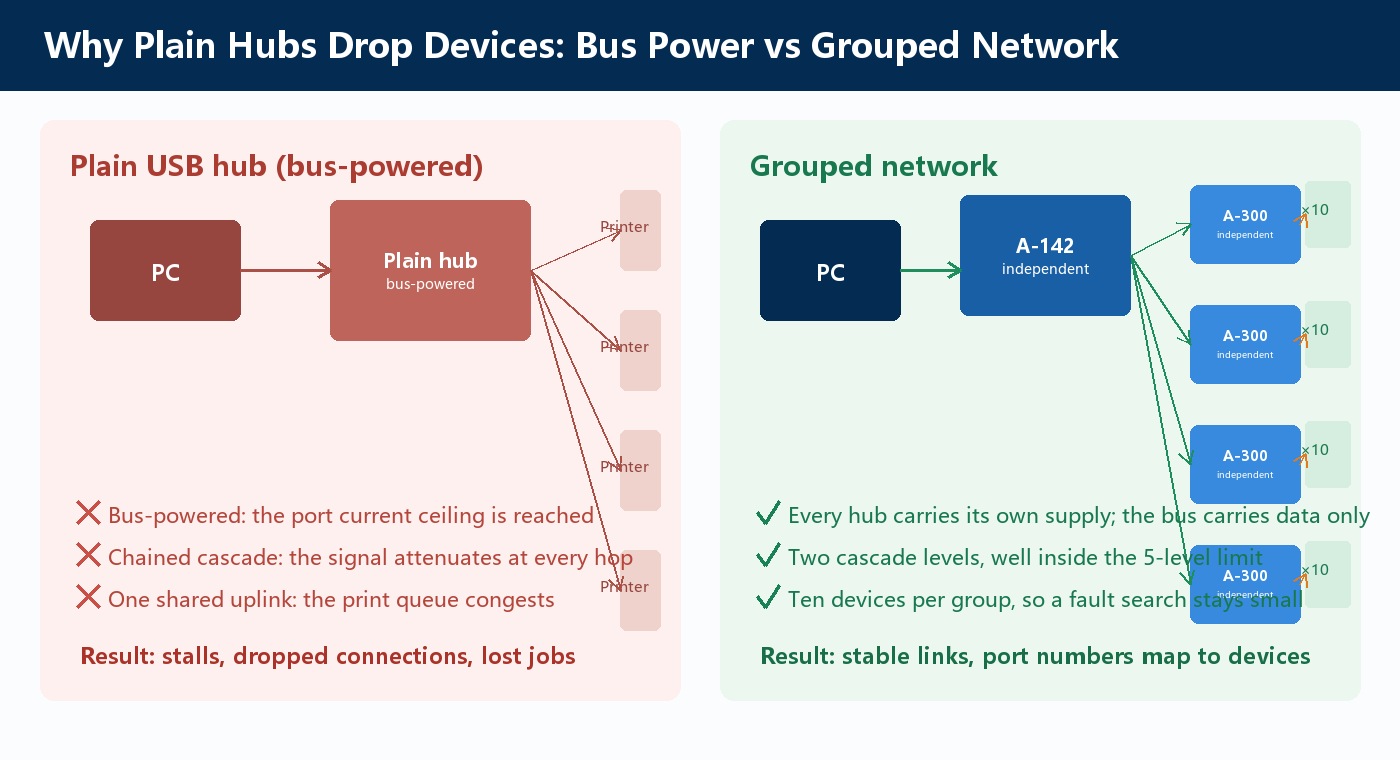
Bus power runs out. A plain USB hub has no power supply of its own. It draws current from the host port, and USB 2.0 allocates 100mA to a low-power device and 500mA to a port at full load. The hub consumes an allocation before powering anything downstream. Fill the remaining ports and the budget is gone, and printers drop during enumeration or when they draw their startup surge.
Cascade structure degrades the link. The USB 2.0 specification permits up to 5 levels of cascade. The real problem is how it is chained. A single line — A to B to C to D — attenuates the signal at every hop, and the retry rate climbs with it. The specification's own guidance is to attach multiple hubs to the same parent, which produces a tree.
The uplink is shared. Every printer behind a hub shares the single link back to the host. Forty printers submitting jobs simultaneously are forty devices on one link. Each job is small, but the concurrency is not, and the queue stalls in a way that reads as a driver problem rather than a topology problem.
Sipolar's approach changes the structure rather than only adding ports.
Every level carries its own power supply. The A-142 ships with a 12V/1A adapter. The A-300 ships with a 12V/5A adapter and accepts DC 9-24V wide-range input. Both draw their current from the adapter, and the host USB port carries data only. The bus-powered current ceiling is removed.
The topology is a two-level tree, not a chain. The A-142 acts as the first level. Its four USB-A downstream ports each feed one A-300, whose USB-B uplink port connects back to the A-142. Each A-300's ten USB-A downstream ports take one printer each.
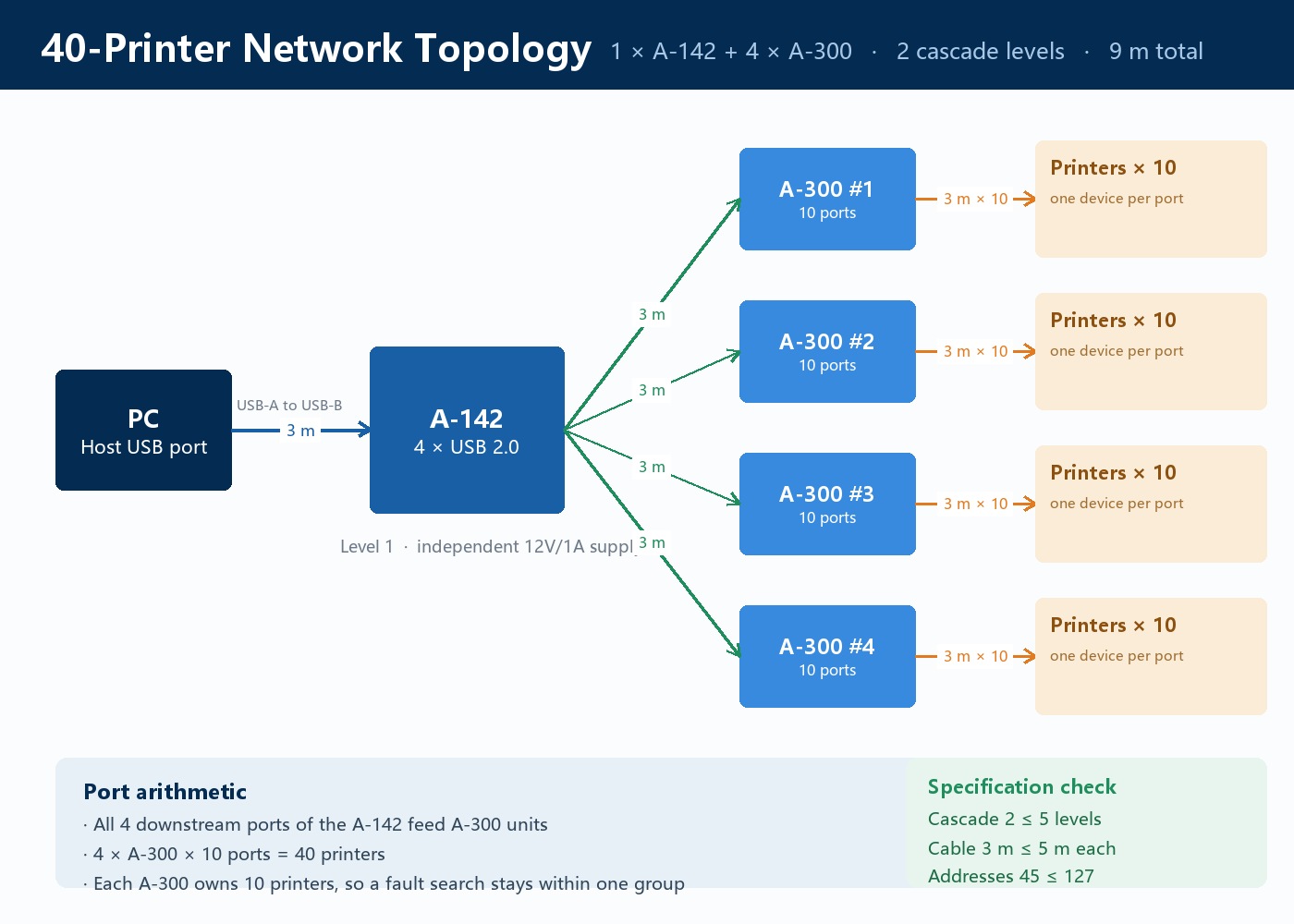
From the computer to a printer the signal crosses two levels. Cascade depth 2 sits well inside the 5 levels the specification allows, so signal attenuation accumulates across two hops rather than an open-ended chain.
Ten printers per group, numbered. Every A-300 silkscreens its ten ports as USB1 through USB10.
That numbering is what makes fault-finding practical. When one printer stops responding, the dark LED on the A-300 panel tells you which group to investigate. Swapping cables, swapping printers, and swapping ports all happen inside a ten-printer group instead of a forty-printer floor.
| Item | A-142 | A-300 |
|---|---|---|
| Downstream ports | 4 × USB-A 2.0 | 10 × USB-A 2.0 |
| Uplink interface | USB-B 2.0 | USB-B 2.0 |
| Transfer rate | 480Mbps | 480Mbps |
| Power input | DC 12V, 12V/1A adapter included | DC 9-24V wide range, 12V/5A adapter included |
| Maximum current per port | 5V/500mA | 5V/600mA |
| Total power | ≤12W | ≤54W |
| Dimensions | 100 × 63 × 30mm | 143 × 80.6 × 23.94mm |
| Enclosure | Stamped metal, one piece | Aluminium extrusion, mounting ears at both ends |
| Port markings | Per-port numbering | USB1 to USB10 silkscreened |
| Protection | Output over-current, output short-circuit | Over-current, over-voltage, leakage, short-circuit, spurious noise |
| Operating temperature | -25℃ ~ +80℃ | -25℃ ~ +80℃ |
| Certification | CE / FCC / RoHS | CE / FCC / RoHS |
Both are pure data extension devices without BC1.2 charging protocol, and both require a host connection to operate.
All four downstream ports of the A-142 feed A-300 units. Four A-300 units, ten ports each, one printer per port. 4 × 10 = 40.
Cable length works out to three segments of 3 metres:
End to end that is 9 metres. USB 2.0 limits a single cable to 5 metres, so 3 metres per segment is comfortable.
One point that gets misread. Ten printers on one A-300 use ten separate 3-metre cables. They are not daisy-chained into a single 30-metre run. The total cable length stays at 9 metres regardless of how many printers you add.
The structure does not change. Add a second A-142 on another host port. Each A-142 feeds four A-300 units, eight in total.
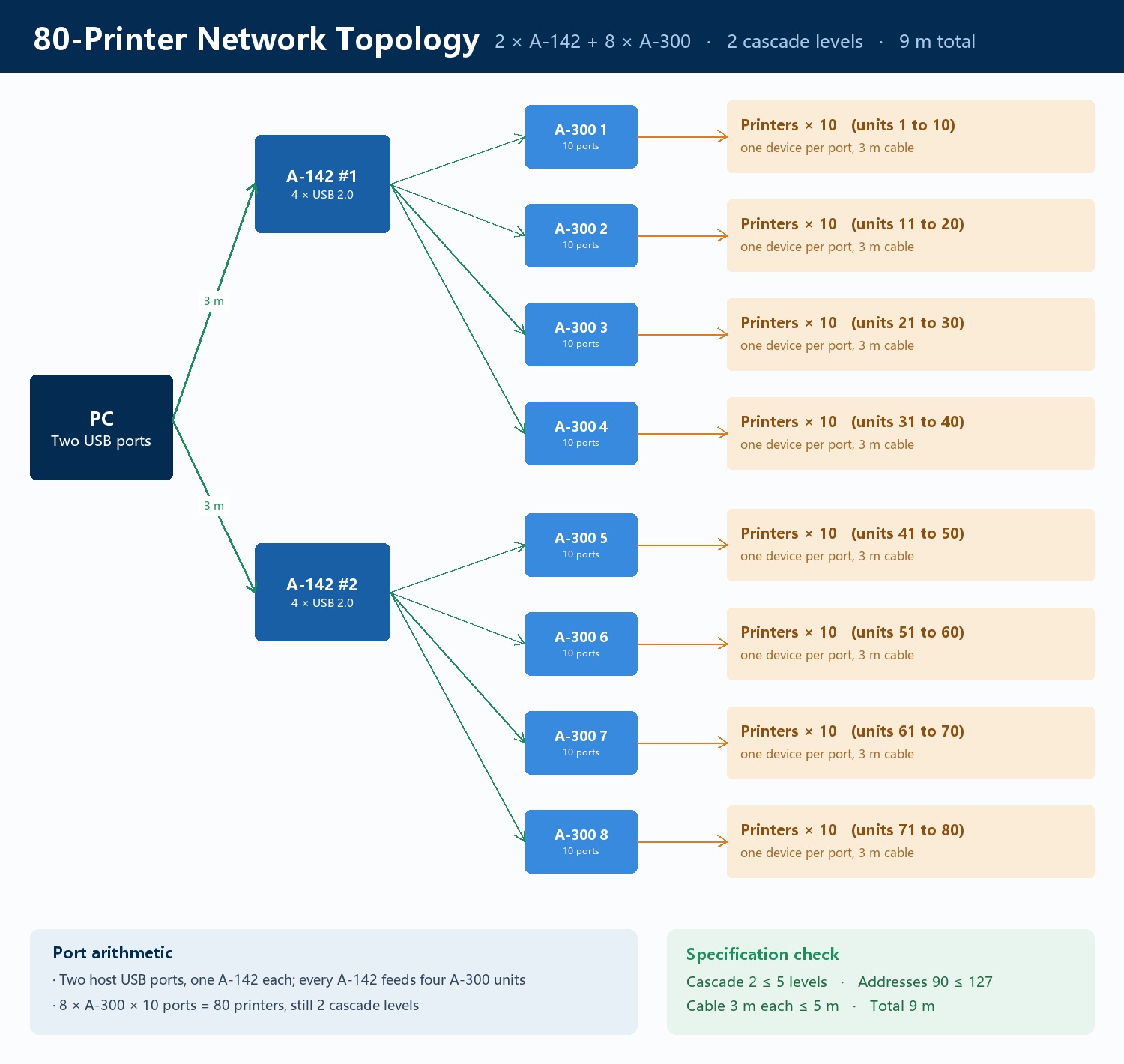
8 × 10 = 80 printers, and the cascade depth is still 2. Doubling the printer count did not deepen the topology.
The same logic scales further. Three A-142 units on three host ports, each feeding four A-300 units, give twelve A-300 units and 120 printers. Whether the host can enumerate that many devices is a question about the host controller, not about the hubs.
Each of these is a hard boundary, and the topology stays inside all of them.
| Constraint | This network | USB 2.0 limit |
|---|---|---|
| Cascade depth | 2 levels | 5 levels |
| Cable length per segment | 3 m | 5 m |
| Total distance, PC to printer | 9 m | 30 m (5 hubs, six 5 m cables) |
| USB addresses, 40-printer plan | 45 | 127 |
| USB addresses, 80-printer plan | 90 | 127 |
Bandwidth is the shared resource. The A-300 is rated at 48Mbps per port, and 40 printers share one uplink link. For print jobs that is not a constraint, because the data volume per job is small. If the same printer is also pushing large scan files directly to the PC, that changes the calculation.
Printer power is not the bottleneck. The printer body runs on mains power. The USB cable carries data and handshake only, so the load on the hub is small. The A-300's 5V/600mA per port and the A-142's 5V/500mA per port have plenty of headroom here.
Driver and port numbers. Each printer takes its own port number, shown as USB001, USB002 and so on. With forty printers, verify the mapping once against the physical labels. Sending a job to the wrong machine is more disruptive than a dropped connection.
Print queue behaviour. When one driver loads across many devices, Windows builds a separate queue entry for each. Queue scheduling takes resources of its own. Run a batch of ten or fifteen first, confirm the queues respond normally, and then scale up.
If this topology still does not suit the site, there is a route that bypasses USB entirely.
Printers such as the HP LaserJet CM8050 carry a 10Base-T/100Base-TX network port. With a network print server, each printer takes an Ethernet cable into a switch, and the PC discovers them over the network.
That removes the USB cascade limit and the bandwidth sharing entirely, and a hundred printers on one switch is not a demanding configuration. The cost is that every print position needs a network cable run to it, which is a larger installation job than plugging into a hub.
Which route is shorter depends on whether the site is being wired permanently or set up temporarily.
When printer counts outgrow the available USB ports, the instinct is to buy a larger hub. Sometimes that is enough. Often the better answer is a different topology.
Independent power at every level, a two-level tree instead of a chain, and ten-device numbered groups resolve three separate problems at once. They remove the bus-powered current ceiling. They cap signal attenuation at two hops. And they give you ten printers to search instead of forty.
Sipolar supplies the A-142 and A-300 for this topology. Send over your printer count, the distance from the PC to the farthest print position, and the cable routing available on site, and we will work through the port and cable arithmetic with you.
Specifications are subject to the official Sipolar product documentation and the product pages on sipolar.com. This article contains no customer names, customer cases, or on-site information.
Sipolar is a brand of Shenzhen Lpsen Technology Co., Ltd.