- Room 525,Building 7D,Hengda Shishang Huigu,Dalang Street,Longhua District,Shenzhen,China,518109

There are situations where filling every port is the problem rather than the solution.
Wireless product testing is one. Twenty modules under test, all plugged into a hub, all powered at the same instant. Twenty transmitters running together, and the RF interference makes the test results worthless.
Bank counters are another. Forty-eight U-Keys plugged into the counter, and the client walks up to one terminal. The application should enable that one port and leave the other forty-seven dark.
Both cases come down to the same requirement: a port should not energise merely because something is plugged into it. Software decides which path is live and which path is dead.
A conventional hub cannot do this. It powers up every port it has and carries whatever data arrives. The only control available is cutting power to the whole unit.
The SH3 / SH2 smart control series from Sipolar exists for these cases.
The difference is control.
Conventional hub: plug in, energise, transfer data, and the only thing you can do is remove power from the entire device.
Smart control hub: each downstream port has its own control circuit. The host issues a command, and the path that conducts is decided by the program, not by the presence of a connector.
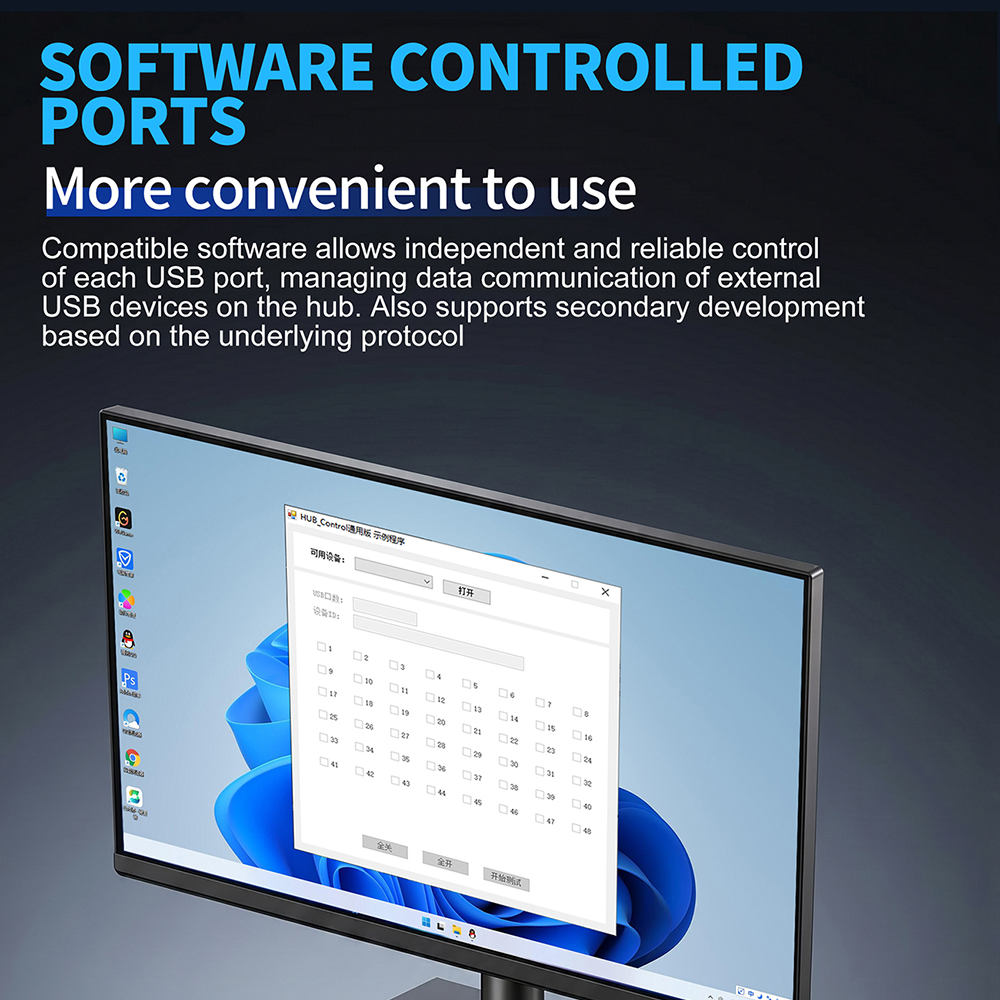
The SH3 / SH2 series uses a high-performance microcontroller to control each USB port independently and reliably. Every downstream port can be switched by PC software, and a serial communication protocol is provided so the control program can be written against it.
One thing to be clear about: the hub itself does not include screen projection, device farm, or flashing software. We supply the protocol and the interface. The control application is developed by the customer or sourced separately.
That is also the fundamental difference from a conventional hub. A conventional hub works the moment you plug it in. A smart control hub hands you a component that your own software has to drive.
For anyone planning to develop against it, this is the part that matters.
Communication runs over serial at 9600 baud, 8 data bits, no parity, 1 stop bit. A packet has four parts: header, command byte, data, and checksum.
The header is a fixed 0xF3.
There are four command bytes.
| Command | Function | Trailing data |
|---|---|---|
| 0x01 | Acknowledgement | 2 bytes, or 12 bytes when returning an ID |
| 0x02 | Write | 2 bytes |
| 0x03 | Read | None |
| 0x05 | Read device ID | 12 bytes |
Any command comes back with the command byte replaced by 0x01.
The data field is 2 bytes, 16 bits, high byte first. A bit value of 1 means open, 0 means closed.
The checksum is a 16-bit CRC covering all preceding bytes, with the complete lookup table provided.
Take the SH3-12 as the example. Its 14 IOs are allocated like this. IOs 1 through 12 control the 5V supply of each of the twelve USB ports. IO 13 controls data communication across all ports. IO 14 controls the buzzer.
IO 13 deserves particular attention. It is a global communication control that operates independently of the per-port supply switches — a second layer of control. If you need a device to stay powered while its data path is cut, that is the bit to use.
Some command examples:
F3 02 00 00 92 A0    Close all USB ports
F3 02 00 01 53 60    Open port 0
F3 02 00 05 52 A3    Open ports 0 and 3
F3 02 10 01 5E A0    Open port 0, with IO 13 also open
F3 03 05 41          Read USB port status
F3 05 85 43          Read device ID
Two protocol characteristics matter during development.
The device is a slave and never initiates. It validates every packet on arrival. An illegal packet gets no response at all; a legal one is executed and answered within 10 milliseconds. That lets the host program implement timeout and retry logic without worrying about unsolicited traffic.
Each unit carries a 12-byte unique ID, retrievable with command 0x05. When several hubs hang off the same computer, that is how the software tells them apart.
One characteristic of the USB bus applies here as it does everywhere: bandwidth is shared, not per port. A 480Mbps uplink divided across 48 ports leaves roughly 10Mbps each in practice, and a 5Gbps uplink across 10 ports leaves considerably more. Per-port switching controls when a device is live; it does not create bandwidth for it.
Four models cover the common ranges, split by port count and data rate.
| Model | Ports | Rate | Max current per port | Built-in supply | Size mm |
|---|---|---|---|---|---|
| SH3-10 | 10 × USB-A 3.0 | 5Gbps | 5V/2.1A | 5V/22A (110W) | 265×171×45 |
| SH3-20 | 20 × USB-A 3.0 | 5Gbps | 5V/2.1A | 5V/40A (≤200W) | 440×232×45 |
| SH2-48 | 48 × USB-A 2.0 | 480Mbps | 5V/0.5A | 5V/22A | 446×160×89 |
| SH2-96 | 96 × USB-A 2.0 | 480Mbps | 5V/0.5A | 12V/12.5A | 440×300×175 |
SH3-12 (12 ports, USB 3.0, 5V/2.1A per port, ≤110W, 225×107.5×57mm) and SH3-15 (15 ports, USB 3.0, external 5V/5A adapter, 5V/900mA per port, ≤23W, 188.8×127.6×27.3mm) are also available, with more ports in a smaller footprint.
The selection logic is short.
For USB 3.0 speed and 2.1A per port, choose within the SH3 family by port count.
For large-scale attachment of dozens or hundreds of devices, choose SH2-48 or SH2-96.
The caveat on the SH2 series matters. Both are USB 2.0 with a maximum of 5V/0.5A per port. That is the right specification for U-Keys, key drives, and hardware dongles. It is not the right specification for mechanical hard drives.
The SH3 series carries its own industrial power supply, which removes two problems at once: no external adapter to lose, and no adapter to upgrade when the load grows.
The SH3-10 has 110W built in, 5V/22A. Ten ports at the 5V/2.1A maximum would need 10 × 5V × 2.1A = 105W, which sits inside that budget. The SH3-20 carries 5V/40A (≤200W); twenty ports at 2.1A is 210W, also within its built-in capability.
The SH2-48 and SH2-96 run USB 2.0 at 5V/0.5A per port. Forty-eight ports at full load is 120W and ninety-six is 240W, both covered by the internal supply — but only for small-power devices.
The scenario from the opening. Twenty modules stay plugged in, and the test program enables one port at a time, closing each before opening the next.
The RF environment stays clean and the results mean something. Before per-port control, the only option was unplugging modules by hand, one after another.
The most common use for this series. Forty-eight U-Keys plugged into an SH2-48, with software binding the physical address of each USB port to a specific key. Which key belongs to which business function is decided by the software.
This is also how port numbering is fixed. The binding is done in software, not by the hardware, and it is not something a conventional hub can offer.
Fiscal control devices, card readers, and USB dongles sit inside counter and terminal equipment where they are not meant to be unplugged by hand. When a device hangs, fails to enumerate, or takes the application down with it, the program can restart that one port without anyone opening a cabinet.
Power the devices up in batches, or drop and restore them on a schedule. Either logic is a few lines in the upper-computer program. Without a program, it is a person standing at the equipment flipping switches.
Drivers. Windows 10 needs no driver installation. Windows 7 requires the serial driver (PL2303TA or CH340G, depending on the production batch), downloadable online or available from us. On Windows 7, a missing driver is the most common first problem.
Allow for re-enumeration time. Closing a port and opening it again means the device re-enumerates. That takes a few hundred milliseconds to several seconds, depending on the device firmware. Timeout and retry handling in the program is not optional.
Read the panel LEDs. Each port has an LED indicator. A powered port with no device attached shows red; a port with a device working shows green. Note that this is the opposite of the usual "red means alarm" intuition. When a port does not light up, that is where to look first.
Input voltage. The built-in supply is set to the 220V range at the factory. For a 110V environment, tell the sales contact in advance, otherwise the unit will not operate correctly.
This is where the series earns its place.
The protocol and the interface are open. What arrives is a component that goes into your own system, not a closed box.
Drive the ports from your business system. A work order system issues the commands. When a process step needs a particular device energised, the workflow transition sends a command as it happens.
Build a test scheduling hub. Twenty products in a batch: the program opens each port in turn, collects what comes back from each, and writes a report. Changing model means editing a port mapping table.
Run a health sweep. Read the status of every port on a timer, power-cycle any port that reports a fault, and write it to a log.
Enforce safe timed access. Some devices do not tolerate multiple instances online at once. The program releases them in sequence so exactly one is working at any moment.
Binding procedures and the serial protocol are available from our customer service team. OEM and ODM are supported: port configuration, power supply scheme, enclosure, logo silkscreen, mounting method, and the protocol and interface coordination required for secondary development can all be specified against the finished unit.
The product carries a 3-year warranty with lifetime technical support. Minimum order quantity is 1 piece, and standard orders ship within 3 days.
Some situations get worse the more ports you fill.
Wireless products have to be tested one at a time. U-Keys have to be enabled one at a time. A device that has hung needs to be restarted on its own. A conventional hub leaves all of that to a person standing at the equipment.
A smart control hub hands "which path is live" to the program. Writing that logic is the work that remains.
Sipolar's SH3 / SH2 series provides controllable hardware and a protocol open enough to build against. Send over your device count, the current each device needs, and how your program intends to schedule the ports, and we will work through the model and protocol details with you.
Specifications are subject to the official Sipolar product documentation and the product pages on sipolar.com. This article contains no customer names, customer cases, or on-site information.
Sipolar is a brand of Shenzhen Lpsen Technology Co., Ltd.