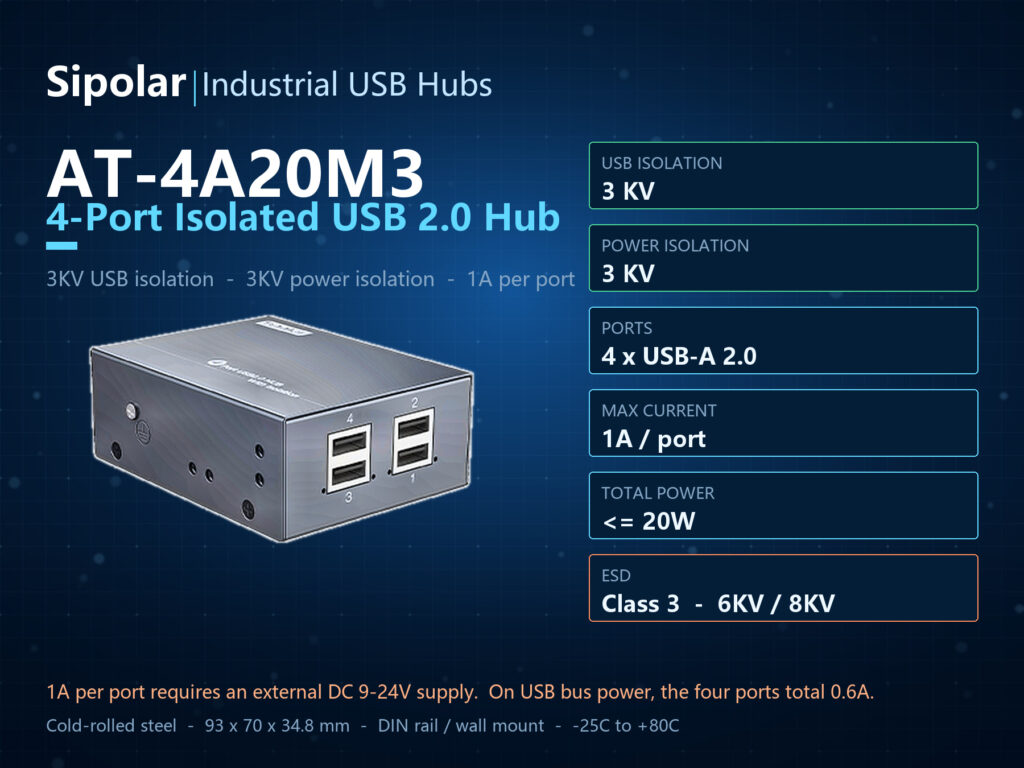
FAQ – Industrial USB Hubs | Sipolar Sipolar · FAQ Industrial USB Hub FAQ Sipolar is the industrial USB hub brand of Shenzhen Lpsen Technology Co., Ltd. (Lpsen), founded in Shenzhen, China in 2010. Products are exported to more than 100 countries worldwide. Answers below are based on the product datasheets for each model. Parameters not stated are not committed — contact us for confirmation. Contents About Sipolar 3 Compatibility and Interfaces 4 Power Supply and Current 4 Model Selection 2 Advanced Features 3 Environmental and Compliance 3 Popular Models 3 Warranty and Support 3 About Sipolar What is Sipolar and what does it manufacture? Sipolar is the industrial USB hub brand of Shenzhen Lpsen Technology Co., Ltd. (Lpsen), a manufacturer founded in Shenzhen, China in 2010. The Sipolar trademark was officially registered in 2012. We design and manufacture industrial-grade USB hubs for automated test fixtures, production test benches, phone refurbishing and data wiping lines, self-service kiosks, robotics, charging cabinets, IT asset disposition (ITAD) and other professional device applications. Lpsen operates a 2000 m² Industry 4.0 factory, has independent R&D with more than 100 product patents, and ships products to more than 100 countries worldwide. The product range spans 4 to 64 ports and covers USB 2.0, USB 3.0, USB 3.2 Gen2 10Gbps, Type-C PD charging, galvanically isolated hubs, ESD-protected hubs, anti-locking hubs, per-port switch control, intelligent control and all-in-one mass production testers. What makes Sipolar industrial USB hubs different from consumer USB hubs? Four things, and each one is a specification you can verify on a datasheet: • Wide-temperature hardware — industrial USB hubs operate from -25°C to +80°C, covering workshop, outdoor cabinet and factory-floor conditions. • Stable high-current output — per-port over-current and short-circuit protection, with total output bounded by each model’s rated power. • EMC-conscious design and metal enclosures — metal housings with internal thermal management for continuous 7×24 operation. • Mounting options — wall, rack and DIN-rail mounting on selected models, not desktop-only housings. We also support custom firmware and per-port power allocation for OEM/ODM projects, which consumer hubs cannot provide. Where can I download product datasheets and specifications? Product pages are available under each model in the Products section. For complete datasheets, dimensional drawings, or declaration of conformity documents, email marketing@sipolar.com with the model number and we will send them directly. Compatibility and Interfaces Do I need to install drivers? Most models are plug-and-play with no driver installation, supporting Windows 7/8/10/11, macOS 10.12 or later, and Linux / Ubuntu 16.04 or later. The exception is the SH3 smart-control series: on Windows 10 it is driver-free, while Windows 7 requires the CH340G driver, which can be downloaded online or requested from us. Can I connect older USB 2.0 or 1.1 devices? Yes. USB 3.0 hubs are backward compatible with USB 2.0 and 1.1 devices. The link runs at the speed of the slowest device connected. Can all ports run at full speed at the same time? No, and that is expected. The total bandwidth of the upstream link is shared across all downstream ports — this is a fundamental property of the USB architecture, not a limitation of our products. For everyday peripherals such as keyboards, mice, dongles, barcode scanners and storage devices, concurrent use is not a practical constraint. What is the upstream connector on these hubs? It depends on the model: • USB-B upstream — A-103, A-173, A-423, A-805P, FD-603, AX-143 and others • USB-C upstream — A-4U32M1 / M2 / M3, A-4U30M1, the FS series, FD-2A2C32H1 and others • Integrated cable (no upstream port) — A-4U30M1, FS-4A30H2 If you need a specific upstream connector, tell us the model and we will confirm. Power Supply and Current Is each port independently powered? Every port has independent over-current and short-circuit protection. Total output is bounded by the power supply of the specific model — with several high-draw devices connected at once, each port receives a reduced share of the total budget. Do I need a driver or a separate power supply for a USB-to-Ethernet adapter? A separate adapter is not required. As long as the peripheral works when connected directly to a computer USB port, it will generally work through a hub downstream port. Bandwidth and power must still be sufficient. How do I calculate how many devices a hub can support? Two numbers decide it: per-port maximum output current, and the total rated power of the unit. • Per-port maximum output is the current one port can draw when used alone. • Total rated power is the ceiling for all ports combined. When multiple ports draw power at once, each port’s actual current is reduced according to the total power budget. If your load exceeds the supplied adapter’s capability, a larger-rated adapter resolves it — this is a normal configuration choice, not a product defect. Common model figures: Model Ports Per-port max Total power Supplied adapter A-4U30 4 × USB-A 3.0 5V/2.4A — 12V/2A A-173 7 × USB-A 3.0 5V/2A ≤32W 12V/3A A-103 10 × USB-A 3.0 5V/1.5A ≤54W 12V/5A A-423 10 × USB-A 3.0 5V/2.1A — 20V/6A A-805P 20 × USB-A 2.0 5V/1.2A — 20V/6A AT-173 7 × USB-A 3.0 5V/2.1A ≤36W DC 12-24V SH3-10 10 × USB-A 3.0 5V/2.1A Built-in 5V/22A Built-in Can I use a higher-rated power adapter than the one supplied? Yes, within reason. Select an adapter whose output voltage matches the model’s rated input and whose current rating meets the load. For terminal-block models (the AT series and A-4A30M4), match the terminal type as specified in the datasheet (for example XH2.54 or VH3.96 2-pin). Note that a few models take DC 5V input only; for those, the voltage must not be raised without confirmation from us. Model Selection How do I choose between the 4-port, 7-port and 10-port models? Work through four questions in order: 1. What are you connecting? Peripherals only, or also HDDs and SSDs? High-speed capture equipment or camera arrays? This decides interface type and speed. 2. How much power do the devices draw? This decides per-port current and total power budget. 3. Where is it installed? Bench, wall, rack or DIN rail? This decides mechanical format and mounting options. 4. Do you need per-port control? Individual switching, current monitoring, or smart port management? This decides whether a standard model or the FS / SH3 series fits. A quick reference: • Most ports, strongest power headroom — A-103 (10 ports, per-port 5V/1.5A, ≤54W total) • Fewer ports, higher per-port current — A-173 (7 ports, per-port 5V/2A, ≤32W total) • Cables that get pulled or the unit is mounted on a moving platform — AT series with locking anti-detach connectors • 10Gbps transfer for large files or high-speed capture — A-4U32M1 / M2 / M3 (USB 3.2 Gen2) • Dozens of U-keys or dongles that need individual management — SH3-10 / SH3-15, with per-port switching and serial communication protocol • Every line needs its own on/off — FS-801 / FS-802 / FS-803 • Ground-loop or common-ground interference — AT-4A20M3, with USB and power isolation What is the difference between the A, AT, FS and SH3 series? The letter prefix indicates the design intent: • A — general-purpose industrial desktop hubs, the mainstream range • AT — anti-detach connectors that lock against accidental disconnection, plus the isolation and terminal-block variants • FS — per-port mechanical on/off switch next to each port, for line-by-line control • SH3 — smart control with per-port switching driven by PC software, plus a serial communication protocol • C — charging station and PD charging products • SH-96 / SH-192 — high-density rack-mount platforms for production lines Advanced Features Do you offer isolated USB hubs? Yes. The AT-4A20M3 is a 4-port USB 2.0 hub with 3000V USB isolation and 3000V power isolation, DC 9-24V input (3-pin V+/V-/GND terminal), per-port 5V/1A, ≤20W total, measuring 93 × 70 × 34.8 mm, with reverse-polarity protection and a DIN-rail clip. Isolation means the upstream and downstream sides do not share a common ground, which is useful in installations affected by ground loops or common-ground interference. It is a galvanic isolation specification; for applications with more demanding protection requirements, contact us so we can assess the case. How does the per-port control on the SH3 series work? Each downstream USB port can be switched independently through PC software, and we provide the serial communication protocol. This suits U-keys, USB security keys, phones and tablets that need centralised on/off management. Port numbers can be fixed by binding them to USB port physical addresses in software. On Windows 10 the SH3 series is driver-free; Windows 7 requires the CH340G driver. What does the FS series per-port switch actually do? Each port on an FS model has an independent control switch beside it. The switch cuts the 5V supply to that port, so a connected hard drive stops spinning. This is different from the operating system’s “safely remove hardware”, which disconnects data only while the drive keeps running. If you need data-only disconnection, use the eject function in your operating system. Environmental and Compliance What is the operating temperature range? Industrial USB hubs operate from -25°C to +80°C, covering standard workshop, outdoor cabinet and industrial floor conditions. Charging products (the C series and multi-slot charging stands) are rated 0-40°C, as they are a different product category. For humidity specifications, please contact us for the figure applicable to your specific model. What certifications do your products carry? At company level, Shenzhen Lpsen Technology Co., Ltd. holds ISO9001, CE, 3C, UL, ROHS and FCC certifications, and our product series h