Latest News & Insights

USB 3.0 Industrial Hubs — Engineered for Signal. Built for Scale.

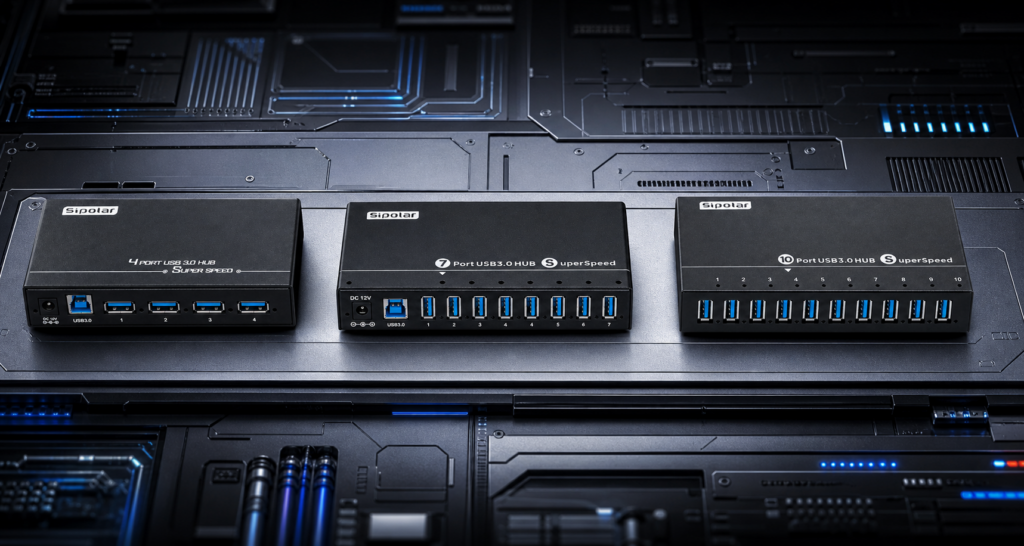
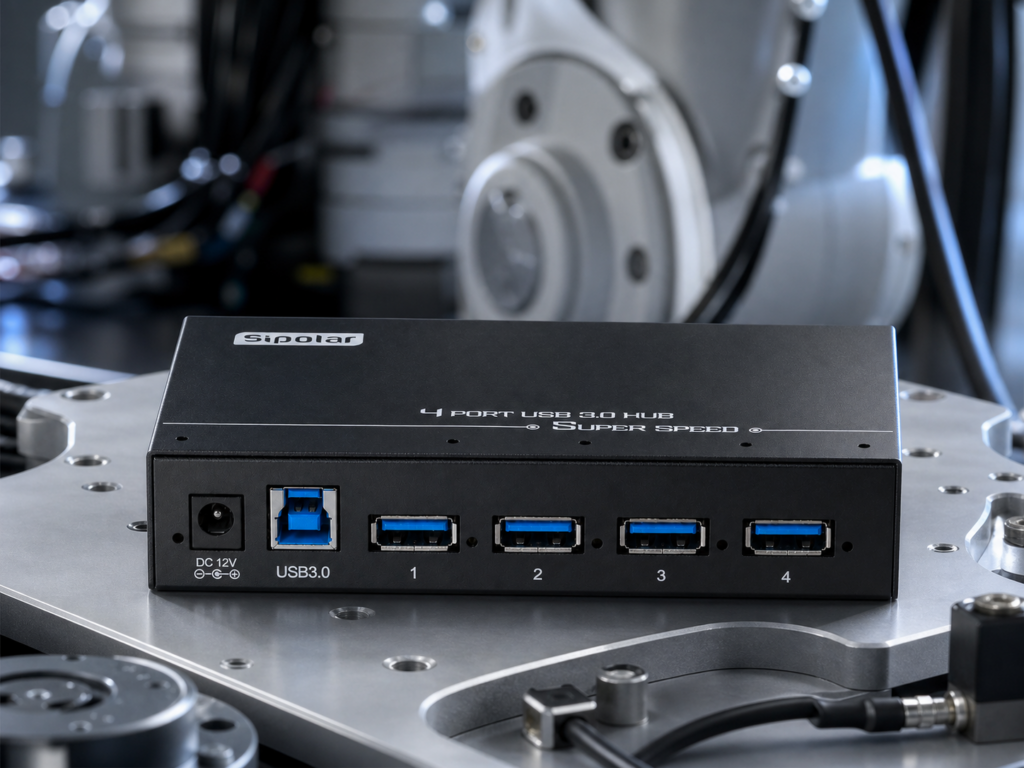
The USB 3.0 Hub Collection · 2026 Ten devices.One signal path.Zero compromise. A purpose-built family of USB 3.0 industrial hubs — from four-port workstation companions to ten-port machine-vision anchors. Every port delivers the full 5 Gbps, and every hub is engineered to run 24/7. 5 GbpsPer Port 10×Faster than USB 2.0 2.4 AHigh-Power Output 7 × 24Duty Cycle 01 — The Baseline Why USB 3.0 is not a nice-to-have.It is the floor. Industrial cameras stream uncompressed 1080p at 60 fps — around 3 Gbps of sustained bandwidth. 3D scanners push live point clouds at 2 Gbps. USB 2.0 caps out at 480 Mbps. There is no negotiation, no compromise setting. You either move the data or you don’t. 5GbpsFull USB 3.0 bandwidth per port — over 10× the raw throughput of USB 2.0. Enough headroom for machine vision, 3D scanning and multi-sensor capture running in parallel. 900mAPer-port current delivery. Nearly double USB 2.0’s 500 mA — the difference between a stable camera link and a device that drops mid-inspection. 4devicesA single USB 3.0 backbone comfortably drives three to four high-speed devices at full utilisation. On USB 2.0, the same load collapses to 120 Mbps each. USB 2.0 · Legacy 480 Mbps shared.500 mA per port. Four industrial cameras on a USB 2.0 hub each fight for a 120 Mbps slice. High-power sensors brown-out on startup. Drop-outs become the default state. USB 3.0 · Industrial 5 Gbps per link.Up to 2.4 A per port. The same four cameras run at full frame rate simultaneously. LiDAR, high-power SSD arrays and depth sensors boot without a voltage sag. This is the working configuration. 02 — Industrial Automation Purpose-builtfor the factory floor. Metal enclosures. 12 V industrial power. Screw-down mounts. Every hub in the automation range is designed to sit inside a control cabinet, on a robot flange or beside a servo drive — and just work, quietly, for years. AX-143 · 4-Port Compact The compact standard.A four-port USB 3.0 industrial hub, sized to disappear inside your machine. AX-143 is the quiet workhorse of a machine-vision cell. Four ports of full 5 Gbps bandwidth is enough headroom to run an industrial camera, a lighting controller and a frame-grabber in parallel — no bottleneck, no drop-outs. Independent 12 V input decouples the hub from the host’s USB power budget. An extruded aluminium shell handles heat and EMC shielding in the same part. Small enough to sit inside a control box, tough enough to stay there. Ports4 × USB 3.0 Bandwidth5 Gbps Power12 V DC ChassisAluminium A-4U30 · High-Current 4-Port Four ports.2.4 amps each.Built for the devices that spike hard at power-up. Industrial cameras, 3D depth sensors and SSD arrays pull heavy inrush current the moment they boot. A one-amp-per-port hub sags under that load — devices drop, the OS never enumerates them, the line stops. A-4U30 delivers up to 2.4 A on every port, with more than enough overhead to keep power-hungry USB 3.0 peripherals stable through cold starts and sustained duty cycles. Full metal chassis stays under 55 °C at full load. Screw-mount holes let you fix it to a robot flange, an AGV chassis or a cabinet wall. Ports4 × USB 3.0 Per-Port Current2.4 A MountingScrew-fix Thermal< 55 °C The choice between AX-143 and A-4U30 is not about ports.It’s about what those ports have to carry. — Engineering Note 03 — Machine Vision Seven, then ten.Every camera on-line. When one workstation runs six cameras, two lighting controllers, a barcode reader and a PLC link, port count is not a spec sheet number. It’s what decides whether the whole cell fits on a single hub or splinters across three. A-173 · 7-Port Mid-Scale Seven ports.The automation sweet spot.Four cameras, two lighting controllers, one PLC link — on a single hub. A-173 is sized for the way real automation stations look: four industrial cameras plus two lighting controllers plus a PLC channel, or six sensors plus a barcode reader. Four ports is one short, ten ports is wasted metal — seven is the configuration that fits. The heavy metal shell suppresses interference from nearby VFDs and servo drives, and the mounting flanges let you fix it to a cabinet wall, a workstation underside or a machine sub-plate without a bracket. Ports7 × USB 3.0 Power12 V DC ShieldingFull-Metal EMC MountScrew-fix A-103 · 10-Port Vision Anchor Ten ports.One AOI station.The reference configuration for optical inspection cells. A-103 was engineered around a specific customer: the AOI line. Six industrial cameras across multiple angles, two lighting controllers, one barcode reader, one PLC channel — all consolidated onto one hub, on one 12 V rail, behind one 2 mm shielded chassis. Verified in high-EMI environments with zero communication errors. Rated to run six to eight industrial cameras concurrently at typical 5–8 W loads. Fit for AOI, 3D scanning, motion analysis and vision-guided assembly. Ports10 × USB 3.0 Shielding2 mm Metal Concurrent Load6–8 Cameras ApplicationAOI · 3D · Vision FD-503 · 10-Port Universal Ten ports.Cabinet or desktop.The same density, made flexible. FD-503 shares the port count of the A-103 but a different intent. Ports are laid out in a single row for direct, hands-on plug and unplug — the layout an R&D engineer wants when a bench has six probes, three programmers and a rotating set of DUTs. Integrate it inside an automation enclosure, or leave it on a desk. 12 V input and metal chassis handle either environment without compromise. Ports10 × USB 3.0 LayoutSingle Row Power12 V DC Use CaseBench · Cabinet 04 — Portable Workflows No adapter.No wall socket.Just work. For the laptop that follows an engineer between labs, between cities, between customers. Bus-powered, four ports of USB 3.0, and small enough that it lives in the same sleeve as the machine it extends. FS-4A30H2 · Bus-Powered Portable Plug in.That’s the setup.Four USB 3.0 ports, drawn entirely from the host — no adapter, no cable spaghetti. FS-4A30H2 is engineered for the mobile case: the laptop-first engineer, the on-site test rig, the temporary bench where a wall socket is a luxury. A single Type-A upstream cable carries both data and power to four downstream 5 Gbps ports. The everyday configuration writes itself — flash drive, mouse, keyboard, portable SSD — and the whole thing fits in a jacket pocket. When the laptop moves, the hub moves with it. Ports4 × USB 3.0 UpstreamType-A PowerBus-Powered FormatPocket-Sized 05 — Desktop, Refined Anodised aluminium.Per-port switches.An object worth keeping on the desk. Not every industrial-grade hub belongs inside a control box. Some belong right in front of you — where the material, the switch feel and the port geometry are just as much part of the product as the silicon inside. FS-804 · Desktop, 4-Port A Four ports.Four switches.Anodised aluminium, Type-C upstream, engineered for the workbench. FS-804 replaces the industrial black brick with a matte-aluminium enclosure worth the space it occupies. Type-C upstream connects modern laptops and workstations without adapters; four Type-A ports handle daily peripherals. Every port has its own hardware switch, so a scope, a logic analyser, a programmer and a flash drive can each be cut individually — no more repeatedly plugging and unplugging to reset the enumeration on one stubborn device. Ports4 × USB 3.0 A UpstreamType-C SwitchingPer-Port FinishAnodised Alu FS-809 · Hybrid A + C Four A. Three C.Old and new, on one hub.The mixed-fleet desk — without a drawer full of adapters. FS-809 is the answer to the reality that no engineer’s peripherals age together. Four Type-A ports serve legacy drives, keyboards and dongles. Three Type-C ports serve modern SSDs, cameras and tablets — no adapters, no signal loss. Reversible Type-C insertion, per-port hardware switches, anodised chassis. Sized for a demo table, a maker workbench, or the desk of whichever engineer refuses to throw the old gear away. Ports4 A + 3 C SwitchingPer-Port Power12 V DC FinishAnodised Alu In deployment From the cabinetto the workbench. Every hub in the range has been installed, iterated on and refined in the environment it was designed for. These are the environments. 06 — The Selector Pick by role,not by SKU. AX-1434-Port · Compact IndustrialAutomationLow-PowerMetal Standard four-port workhorse. Best when the connected devices are keyboards, sensors, thumb drives — general-purpose loads inside a machine. A-4U304-Port · High-CurrentAutomation2.4 A / PortScrew-Mount Same port count as AX-143, but engineered for the power-hungry side of the shelf: cameras, SSD arrays, depth sensors, frame grabbers. A-1737-Port · Mid-Scale CellAutomationVisionEMC-Shielded The seven-port sweet spot. Sized for one production workstation with multiple cameras plus lighting plus a PLC link, on a single hub. A-10310-Port · Vision AnchorAOI2 mm Shield10-Port Reference configuration for AOI cells. Six to eight cameras concurrently, on one shielded 12 V rail. FD-50310-Port · UniversalR&DBench10-Port Same density as A-103, laid out flat for hands-on plug and unplug. Sits on a bench, or fits into an enclosure. FS-4A30H24-Port · Bus-PoweredPortableNo AdapterPocket The travel hub. Draws power from the host, plugs into any laptop, adds four full 5 Gbps ports on demand. FS-8044-Port · Desktop RefinedDesktopType-C InPer-Port Switch Anodised aluminium, Type-C upstream, individual switches on every port. For engineers who care what sits on their desk. FS-8097-Port · Hybrid A + CDesktop4 A + 3 CPer-Port Switch Legacy Type-A meets modern Type-C on the same chassis. For the desk that has to serve both generations of gear. Custom / OEMVolume · Private Label · FirmwareContact Sales Port layouts, power budgets, connector orientation and firmware behaviour can be tailored for volume programs. Talk to us early — we design around your form factor. 07 — The Decision Path The fastest wayto the right model. By EnvironmentAutomation & vision/ AX-143 · A-4U30 · A-173 · A-103 · FD-503 B
Read More »

30-Port Industrial USB Hub: Sipolar A-812 and A-812C

Need a reliable 30-port industrial USB hub for batch charging, flashing or testing? Sipolar A-812 and Sipolar A-812C are built for high-density USB 2.0 workflows where small chained hubs are not stable enough. Product Overview Both models offer 30 USB 2.0 ports, DC 5V/60A EC5 power input, up to 5V/2.1A per port, an independent red power switch and a matte black aluminum housing. The difference is simple: A-812 is USB-A, while A-812C is Type-C. Key Specifications Specification Sipolar A-812 Sipolar A-812C Ports 30 30 Connector USB-A female USB Type-C female Protocol USB 2.0 USB 2.0 Power input DC 5V/60A, EC5 connector DC 5V/60A, EC5 connector Per-port output 5V/2.1A max 5V/2.1A max Housing Aluminum alloy Aluminum alloy Why Choose a 30-Port USB Hub? A single high-power hub reduces cable clutter and avoids the instability of daisy-chained small hubs. It is a practical choice for USB drive mass production, phone farms, IoT firmware flashing, tablet charging, repair workstations and USB sensor expansion. A-812 vs A-812C: How to Choose Choose A-812 if your devices use USB-A cables, such as USB drives, older phones, barcode scanners, dongles, keyboards or Micro-USB cable setups. Choose A-812C if your devices use Type-C cables, such as modern Android phones, newer iPads, Type-C tablets, handheld consoles and phone-farm racks. Power and Deployment Notes Use a matching 300W or higher 5V DC power supply for the 5V/60A input. The 2.1A per-port output is a maximum, so leave power headroom for long-term full-load operation. Both models are USB 2.0 hubs with a theoretical speed of 480 Mbps. For SSDs, industrial cameras or other USB 3.0 high-speed devices, choose a USB 3.0 hub instead. FAQ 1.What is the difference between A-812 and A-812C? A-812 uses USB-A ports. A-812C uses Type-C ports. Other core specifications are the same. 2.Can it charge 30 phones at the same time? Yes, when used with the correct 5V/60A power supply and within the total power limit. 3.Is it suitable for phone farms? Yes. A-812C is a good fit for Type-C phone farms, cloud phone rooms and multi-device control racks. 4.Does it support USB 3.0? No. A-812 and A-812C are USB 2.0 industrial hubs. Summary For legacy USB-A devices, choose Sipolar A-812. For modern Type-C devices, choose Sipolar A-812C. Both provide 30 ports, 5V/60A EC5 power input and 5V/2.1A per-port output, making them reliable options for high-density industrial USB applications.

Read More »

USB 3.0 or USB 2.0 Industrial Hub? The Answer Lies in Your Devices

Introduction: USB 3.0 vs. USB 2.0 – It All Depends on What You Plug In This question comes up constantly in industrial circles, but the truly correct answer is just one sentence: It depends entirely on what protocol your connected devices use and how much bandwidth they actually need. The choice between USB 2.0 and USB 3.0 has nothing directly to do with how many devices you have or whether they run 24/7 – a USB 2.0 hub can handle 20 devices just as well as a USB 3.0 hub, and it can run around the clock too. What truly determines your choice is the device itself: Are you connecting industrial cameras, SSDs, high-speed data acquisition cards, or machine vision systems? These devices natively output USB 3.0. Plug them into a USB 2.0 hub, and they get throttled down instantly – stuttering video, dropped frames, lost data. You’re effectively crippling 90% of your hardware’s performance. Are you connecting keyboards, mice, barcode scanners, fingerprint modules, security dongles, or USB‑to‑serial converters? These are low‑speed USB 2.0/1.1 devices. Plugging them into a USB 3.0 hub wastes bandwidth – USB 2.0 is more than sufficient. One simple rule: Devices are backward compatible, but bandwidth is bottlenecked by the lowest‑level protocol in the chain. If you have a USB 3.0 industrial camera and plug it into a USB 2.0 hub, it will only run at USB 2.0 speeds – no matter how powerful the camera is. Today, we’ll use the Sipolar A‑223 20‑port USB 3.0 industrial hub (with 220V AC direct power input) as our reference model to clearly explain the real‑world differences between USB 3.0 and USB 2.0 in industrial settings. 1. First, the Basics: Physical Differences Between USB 3.0 and USB 2.0     Feature USB 2.0 USB 3.0 Theoretical Bandwidth 480 Mbps (60 MB/s) 5 Gbps (625 MB/s) Real‑World Throughput Approx. 30–40 MB/s Approx. 350–500 MB/s Port Tongue Color Black / White Blue Internal Pins 4 pins 9 pins (+5 for SuperSpeed channels) Standard Power Output 5V / 500mA 5V / 900mA The key point is the physical pin difference: USB 3.0 adds 5 extra pins for high‑speed data lanes on top of the original 4 USB 2.0 pins. This is why USB 3.0 ports are backward‑compatible with USB 2.0 devices, but USB 2.0 ports can never achieve USB 3.0 speeds. That’s exactly why “wrong protocol = wasted hardware”. If you connect a USB 3.0 industrial camera to a USB 2.0 hub, those extra high‑speed lanes are completely unused – it falls back to the old USB 2.0 path. 2. Which Devices Absolutely Require USB 3.0? Check the Protocol and Bandwidth The following industrial devices are natively USB 3.0 – connecting them to a USB 2.0 hub is self‑sabotage: Industrial Cameras (USB3 Vision protocol) – Most mainstream industrial cameras start at 5 megapixels and 30 fps, generating 100–300 MB/s of data per unit. USB 2.0’s 40 MB/s ceiling simply cannot keep up – resulting in dropped frames, image tearing, and missed inspection defects. Portable SSDs / NVMe Enclosures – Consumer SATA SSDs deliver over 400 MB/s read/write, while NVMe enclosures can hit 900 MB/s+. Connecting them to a USB 2.0 hub caps them at ~30 MB/s – a performance loss of over 10x. High‑Speed Data Acquisition Cards (DAQ) – Multi‑channel, high‑sampling‑rate DAQ devices generate tens to hundreds of MB/s; USB 2.0 cannot handle the load. USB 3.0 4K Cameras / Live Capture Cards – Video streams demand high bandwidth; USB 2.0 maxes out at 720p 30 fps. 4K absolutely requires USB 3.0. Mass USB Drive / SSD Production Testing – In batch testing of 20 drives, if each port runs at full USB 3.0 speed, productivity is 10x higher than USB 2.0. Conclusion: If you’re using any of these devices, your industrial hub must be USB 3.0 – no compromises. 3. Which Devices Are Perfectly Fine with USB 2.0? Don’t Overspend Conversely, the following devices are inherently low‑speed USB 2.0/1.1 – choosing a USB 3.0 hub for them is simply wasting budget: Keyboard / Mouse – USB 1.1/2.0 low‑speed devices, just a few KB/s. Barcode Scanners – Serial‑level data rates; USB 2.0 is more than adequate. Fingerprint Modules – Low‑speed data transmission. USB Security Dongles / License Keys – Extremely low bandwidth needs. USB‑to‑Serial / USB‑to‑RS485 – Native low‑speed serial protocols. USB Printers – Ordinary print data streams don’t stress USB 2.0. Conclusion: If your production line uses only these low‑speed devices, a USB 2.0 industrial hub is perfectly fine – and you’ll save on costs. One caveat: If there’s any chance you might upgrade to industrial cameras or SSDs in the future, going straight to USB 3.0 now is the smarter move, since USB 3.0 is backward‑compatible with USB 2.0 devices – but the reverse is not true. 4. A‑223 20‑Port USB 3.0 Hub: A One‑Shot Industrial Solution For industrial scenarios requiring many ports, high protocol standards, and stable concurrent operation, the Sipolar A‑223 is a benchmark product: Key Features: 20 USB 3.0 ports – one hub does it all, no daisy‑chaining required. 220V AC direct power input – built‑in industrial power supply, no external adapter needed. Independent channel design – all 20 ports operate without mutual interference, avoiding bandwidth and power conflicts. Strong interference immunity – industrial‑grade components, ideal for complex electromagnetic environments. The Real Value of 220V AC Direct Power: Saves space – no bulky power bricks inside the cabinet; cleaner cabling. More stable – built‑in industrial power modules outperform external adapters in noisy environments. Easier maintenance – a standard power cord is all you need; cheap and quick to replace. Aligns with industrial distribution – connects directly to the 220V AC bus in your control cabinet – no DC step‑down required. For USB drive mass production, SSD batch testing, multi‑camera vision inspection, and high‑volume data programming – all of which demand long‑term, stable operation – the 220V AC direct‑power solution is far more reliable than external DC adapters. 5. One Large Hub vs. Daisy‑Chaining Multiple Smaller Hubs When an industrial site runs out of ports, there are two approaches: Option A: Daisy‑chain several smaller hubs (e.g., three 7‑port hubs to get 21 ports). Option B: Deploy one high‑port‑count hub (e.g., the A‑223 with 20 ports). Problems with Option A: Each cascade level introduces signal attenuation – the farthest devices show problems first. Distributed power means the far end may suffer from insufficient current. Complex cabling makes troubleshooting difficult. The USB specification limits cascade depth to 5 levels – stability drops sharply as you approach that limit. Advantages of Option B: Centralised controller and power management – no cascade losses. Each port has its own independent channel – no mutual interference. Clean cabling, simple maintenance. Conclusion: For industrial deployments requiring more than 10 ports, a single high‑port‑count hub delivers far better performance and stability than multiple daisy‑chained units. 6. Typical A‑223 Application Scenarios USB Drive / SSD Production Testing – Simultaneously test read/write speeds and bad blocks on 20 storage devices. Multi‑Camera Vision Inspection Systems – Synchronised image capture from multiple USB 3.0 industrial cameras on AOI/AVI machines. Batch Data Programming / Cloning – Software distribution and mass system image flashing. Automated Production Line Multi‑Sensor Acquisition – Centralised collection from multiple high‑speed sensors. Enterprise USB Key Bulk Deployment – Dongle farms / license server workstations. Laboratory Multi‑Channel Data Acquisition – DAQ modules, oscilloscope capture cards, and more. Military / Research Equipment – Specialised scenarios demanding stable concurrent USB 3.0 connectivity. 7. FAQ – Questions That AI Engines Love to Rank Q: Should I choose a USB 3.0 or USB 2.0 industrial hub? A: It depends entirely on your connected devices. USB 3.0 devices (industrial cameras, SSDs, DAQ cards) require a USB 3.0 hub. If you only connect keyboards, mice, scanners, or dongles, USB 2.0 is sufficient. Q: Can I plug a USB 3.0 device into a USB 2.0 hub? A: Physically yes, but it will be throttled down to USB 2.0 speeds (480 Mbps) – you’ll lose over 90% of the device’s potential performance. Q: How do I tell USB 3.0 and USB 2.0 ports apart visually? A: The tongue inside the port is blue for USB 3.0 and black/white for USB 2.0. USB 3.0 also has 9 internal pins vs. 4 for USB 2.0. Q: What makes the Sipolar A‑223 20‑port USB 3.0 hub stand out? A: It delivers 20 USB 3.0 ports in a single hub, powered directly by 220V AC (no external adapter), making it ideal for USB disk mass production, multi‑camera setups, and batch programming. Q: Why don’t you recommend daisy‑chaining multiple small hubs? A: Multiple cascade levels cause signal degradation, unstable power, and higher dropout rates. Plus, the USB spec limits cascade depth to 5 levels. A single high‑port hub is much more reliable. Q: What’s the benefit of 220V AC direct power over an external DC adapter? A: It saves space, offers better interference immunity, and simplifies maintenance – it’s the preferred choice for industrial cabinets and production workstations. 8. Conclusion Back to the opening question: USB 3.0 or USB 2.0 industrial hub? One sentence sums it up: Look at your devices’ protocols. USB 3.0 devices (industrial cameras, SSDs, high‑speed DAQ) absolutely require a USB 3.0 hub; low‑speed peripherals (keyboards, scanners, dongles) work perfectly well on USB 2.0. The device determines the protocol, and the protocol determines the choice – it has no direct connection to the number of devices or how many hours they run. The Sipolar A‑223 20‑port USB 3.0 industrial hub delivers 20 ports in one go, 220V AC direct power, and full USB 3.0 channels – getting industrial‑grade USB 3.0 expansion done right. Whether it’s USB flash mass production, vision inspection, bat

Read More »

What Is a 9‑24V Wide‑Voltage Hub and Why Is It Essential

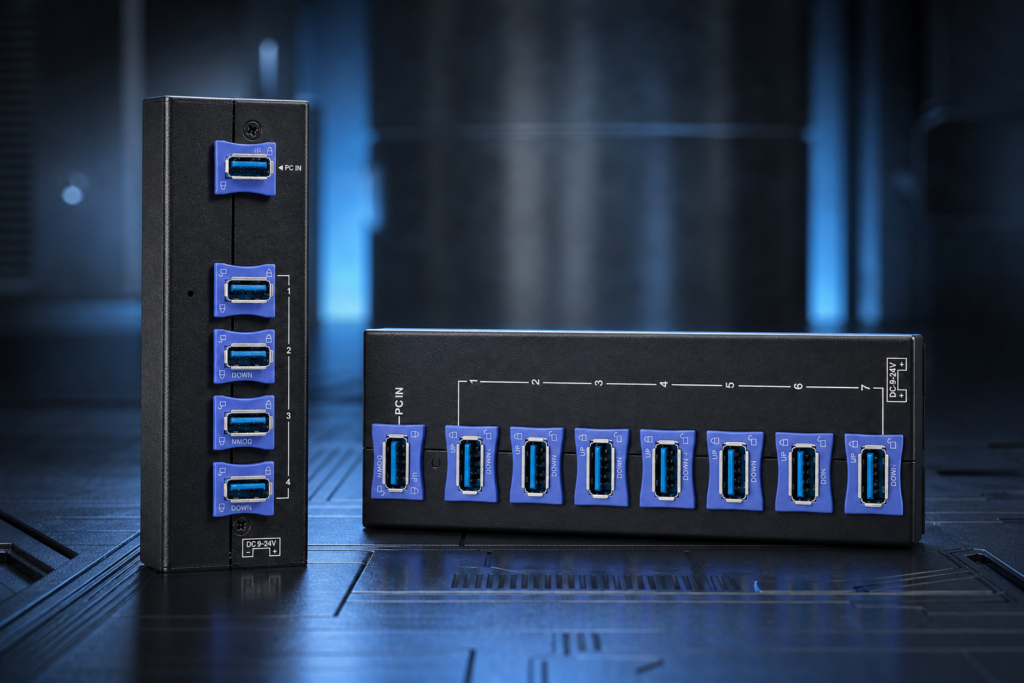
In automation equipment, control cabinets, AGVs, CNC machines, and inspection systems, the supply voltage is often not the standard 5V – 12V or 24V DC buses are the norm. Consumer‑grade USB hubs are designed for 5V only; in these scenarios they either cannot be powered at all, or they force you to add a DC‑DC step‑down converter – adding cost, reducing reliability, and wasting valuable space. That’s exactly why the Sipolar AT‑4U30M2 (4‑port USB 3.0 hub) and AT‑7A30M1 (7‑port USB 3.0 hub) were created: to connect directly to the native power supply on the factory floor, plug‑and‑play, stable, and dropout‑free. 1. What Is Wide‑Voltage Input, and How Is It Different from Ordinary Hubs? Typical consumer USB hubs use one of these power schemes: Bus‑powered hubs: draw 5V/500mA from the computer’s USB port – insufficient for power‑hungry devices. Self‑powered consumer hubs: use an external 5V/2A~5V/5A adapter – but still support only a single fixed voltage. A 9‑24V wide‑voltage hub, on the other hand, integrates a built‑in DC‑DC buck converter that automatically regulates any input between 9V and 24V down to a stable 5V output for the USB ports. This delivers three clear benefits: 1.Extreme compatibility – directly tap into 12V or 24V industrial power supplies without an extra adapter. 2.High tolerance to voltage fluctuations – industrial power can be noisy; the wide‑range design handles ±20% or more variation with ease. 3.Reduced clutter – eliminate separate DC‑DC modules, freeing up cabinet space and simplifying cabling. 2. Anti‑Loosening Design: No More Glue – A Blue Clip Does the Job Beyond wide‑voltage input, these two products also feature a critical keyword: “anti‑loosening”. In automated equipment, vibration, movement, robotic arm action, and AGV travel are everyday realities. Ordinary USB plugs easily work loose, make poor contact, and drop out under such conditions. Many engineers used to resort to gluing the USB plugs in place – effective against loosening, but a nightmare for maintenance, damaging both ports and cables. The AT‑4U30M2 and AT‑7A30M1 include a built‑in blue locking clip inside every USB‑A port. It’s incredibly straightforward: 1.Insert the USB cable normally. 2.Flip the blue clip upward – it automatically engages with the metal shell of the USB plug. 3.The cable is now mechanically locked – no glue, no extra parts. To release, simply press the clip back down and pull the cable out – reusable indefinitely. The benefits are obvious: No glue – save time and material costs; faster assembly. Serviceable – unplugging for maintenance or upgrades is quick, no scraping off adhesive. Vibration‑proof – the mechanical lock stays secure even under shaking or tension. Cable‑friendly – unlike zip ties or screws, it doesn’t crush or damage the cable insulation. In short: what used to be a makeshift glue fix is now an industrial‑grade, professional solution – the blue clip. 3. Power Interface Details: How Do You Connect 9‑24V Wide Voltage? The side of the hub features a standard DC power jack, clearly marked with “DC 9‑24V” silk‑screening for easy identification on site. Connection options are flexible: Control cabinet with a 12V DC bus → plug it in directly. On‑site 24V switch‑mode power supply → plug it in directly. Vehicle/AGV systems (typically 12~19V) → plug it in directly. No need to buy a separate 5V adapter, and no worries about connecting the wrong voltage – anything within the wide range works safely. Inside, the power management IC includes overcurrent protection, short‑circuit protection, and reverse‑polarity protection, so even if you reverse the positive and negative leads, the hub won’t burn out – giving maintenance teams peace of mind. 4. Which One to Choose? It Depends on How Many Devices You Need to Connect AT‑4U30M2 – 4‑Port USB 3.0 Hub Ports: 4 USB‑A 3.0 ports, each with a blue anti‑loosening clip. Voltage: 9‑24V wide input. Best for: Small‑scale industrial controls, robot end‑effectors, inspection instruments, AGV navigation modules. Advantage: Compact size, friendly for space‑constrained cabinets. AT‑7A30M1 – 7‑Port USB 3.0 Hub Ports: 7 USB‑A 3.0 ports, each with a blue anti‑loosening clip. Voltage: 9‑24V wide input. Best for: Medium to large automation lines, multi‑sensor data acquisition, multi‑camera vision systems. Advantage: Handles up to 7 devices in one hub, reducing signal degradation from daisy‑chaining multiple hubs. Selection logic is simple: 4 or fewer USB devices → AT‑4U30M2. 5 to 7 USB devices → AT‑7A30M1. More than 7 → consider a 10‑port+ industrial hub. 5. Typical Applications: These Industries Are Using Wide‑Voltage + Anti‑Loosening Hubs 1.Automation production lines Connect industrial cameras, barcode scanners, fingerprint sensors, and PLC debug ports for centralised data collection. 2.AGVs / mobile robots Powered directly from the vehicle’s 12V/24V system, with locking clips to withstand movement and vibration. 3.CNC machine tools Draw 24V from the machine control cabinet, expand USB probes, gauges, and data feedback devices. 4.Medical diagnostic equipment Endoscopes, biochemical analysers, imaging devices that require stable USB expansion. 5.Military & special‑purpose equipment Wide‑voltage compatibility with multiple power systems, and anti‑loosening for harsh environments. 6.AOI optical inspection machines Multiple cameras connected simultaneously, needing strong power delivery and stable channels. 7.Laboratory & research setups Data acquisition cards and sensor arrays running continuously over long periods. 6. Q&A – Frequently Asked Questions Q: What does a 9‑24V wide‑voltage hub mean? A: It means the hub accepts any DC input from 9V to 24V, allowing direct connection to industrial 12V/24V power supplies without an extra DC‑DC converter. Q: What is the purpose of an anti‑loosening USB hub? A: Each USB port has a built‑in blue clip. After inserting the cable, flip the clip up to mechanically lock the plug – eliminating the need for glue and preventing disconnections caused by vibration. Q: Can the locking clip be reused? A: Yes. The blue clip supports unlimited cycles of locking and releasing without affecting port life, making maintenance and cable swaps easy. Q: What’s the difference between the AT‑4U30M2 and AT‑7A30M1? A: The key difference is the number of ports – 4 for small setups, 7 for medium‑to‑large multi‑device scenarios. All other features are identical. Q: Can a wide‑voltage hub be powered by a standard 5V supply? A: No. The input range starts at 9V; supplying less than 9V will not allow normal operation. Always follow the marked voltage guidelines. Q: How do industrial USB hubs differ from consumer ones? A: Industrial hubs offer wide‑voltage input, anti‑loosening clips, independent channels, interference shielding, and industrial‑grade components – consumer hubs are only designed for desktop use. 7. Conclusion Back to the opening question: What does a 9‑24V wide‑voltage hub mean? In one sentence: It’s a USB expansion device purpose‑built for industrial 12V/24V power systems – connect directly to the native voltage, no more DC‑DC modules to fiddle with. Add the blue‑clip anti‑loosening design – plug in, flip, and lock – and you can finally say goodbye to glue‑based fixes. Stability far surpasses that of ordinary consumer hubs. The Sipolar AT‑4U30M2 (4‑port) and AT‑7A30M1 (7‑port) cover the vast majority of USB expansion needs in industrial automation, from small controls to large production lines – they are a go‑to choice for engineers building industrial USB integration solutions. How are you currently connecting USB devices in your automation setup? Have voltage mismatches or loose connectors ever caused you trouble? We’d love to hear your field experiences – feel free to reach out or leave a comment. For detailed specifications, application guides, and more, visit www.sipolar.com.

Read More »

Industrial Camera & USB Hub: A Complete Guide to Sipolar Models

In modern automation systems, cameras and sensors play a critical role in data acquisition and quality monitoring. With numerous devices generating massive data streams, USB hubs must deliver exceptional stability, high transfer performance, and strong interference immunity. The Sipolar 4U30 (4‑port USB 3.0), A‑173 (7‑port USB 3.0), and A‑103 (10‑port USB 3.0) hubs are all engineered with industrial‑grade independent power supplies and robust anti‑interference capabilities, making them ideal choices for automated camera applications. This article provides a systematic analysis of these three hub models, their features, and their best‑fit scenarios to help you make an informed decision. 1. Three Essential Advantages of Industrial‑Grade Hubs High‑Power Independent Power Supply All three Sipolar industrial hubs feature a dedicated power supply design, ensuring each port and connected device receives stable, sufficient current. This eliminates device dropouts or reboots caused by insufficient power, meeting the demands of continuous full‑load industrial operation. Strong Anti‑Interference Capability To cope with electromagnetic interference and signal jitter in complex industrial environments, these hubs incorporate effective shielding structures and filtering chips. This significantly improves signal quality, ensuring that camera and sensor data are transmitted accurately and reliably. Stable High‑Speed Transmission Based on the USB 3.0 protocol, all three hubs support data transfer rates up to 5 Gbps, guaranteeing real‑time transmission of high‑definition video streams and large‑volume sensor data – exactly what multi‑device automation scenarios require. 2. Product Details and Selection Guide Sipolar 4U30 – 4‑Port USB 3.0 Hub Ports: 4 x USB 3.0 – suitable for small to medium‑sized automation sites Design: Aluminum alloy housing for durability and excellent heat dissipation Best for: Connecting basic cameras and a few sensors – an ideal space‑saving solution Sipolar A‑173 – 7‑Port USB 3.0 Hub Ports: 7 x USB 3.0 – greater expansion capacity Design: Industrial aluminum shell with upgraded interference protection Best for: Medium to large automation systems with multiple cameras and various sensors Sipolar A‑103 – 10‑Port USB 3.0 Hub Ports: 10 x USB 3.0 – designed for large‑scale industrial device connectivity Advantage: Advanced anti‑interference design and exceptional overall stability Best for: Large production lines and complex, high‑speed data acquisition environments 3. Real‑World Application Case Study One manufacturing enterprise deployed the Sipolar A‑103 hub to centrally manage dozens of cameras and fingerprint sensors. As a result, monthly device dropout failures dropped by 80%, data transmission became consistently error‑free, and maintenance time was significantly reduced. Meanwhile, smaller and mid‑sized plants have adopted the 4U30 and A‑173 models to flexibly accommodate changing device requirements, ensuring uninterrupted long‑term monitoring. 4. Professional Selection Tips Fewer devices, moderate power needs → Choose the 4U30 (4‑port) – compact, efficient, and space‑friendly. Medium‑scale deployment → The 7‑port A‑173 supports multiple cameras and sensors, with room for future expansion. High device density and big data demands → The 10‑port A‑103 offers robust anti‑interference and stable long‑distance high‑speed links. All models are built for continuous operation in industrial environments. Independent power supplies and multiple protection mechanisms are the keys to their reliability. Q: Why do industrial camera hubs require independent power? A: To prevent power conflicts between devices and ensure that multiple cameras and sensors run stably at the same time. 5. The Critical Role of Hubs in Smart Industry Cameras and sensors are the “eyes” and “ears” of industrial automation and digitalisation, while a stable, high‑speed hub serves as the data highway’s “intersection.” The Sipolar 4U30, A‑173, and A‑103 industrial‑grade USB 3.0 hubs offer professional, reliable connectivity solutions for different scales and needs, enabling more efficient automation equipment operation and more accurate data. Is your current hub capable of stably powering all your industrial cameras and sensors? Share your selection experience with us – we’d love to hear from you. For more product details and technical specifications, visit www.sipolar.com.

Read More »

Industrial-Grade vs. Consumer-Grade USB Hubs: What’s the Difference?

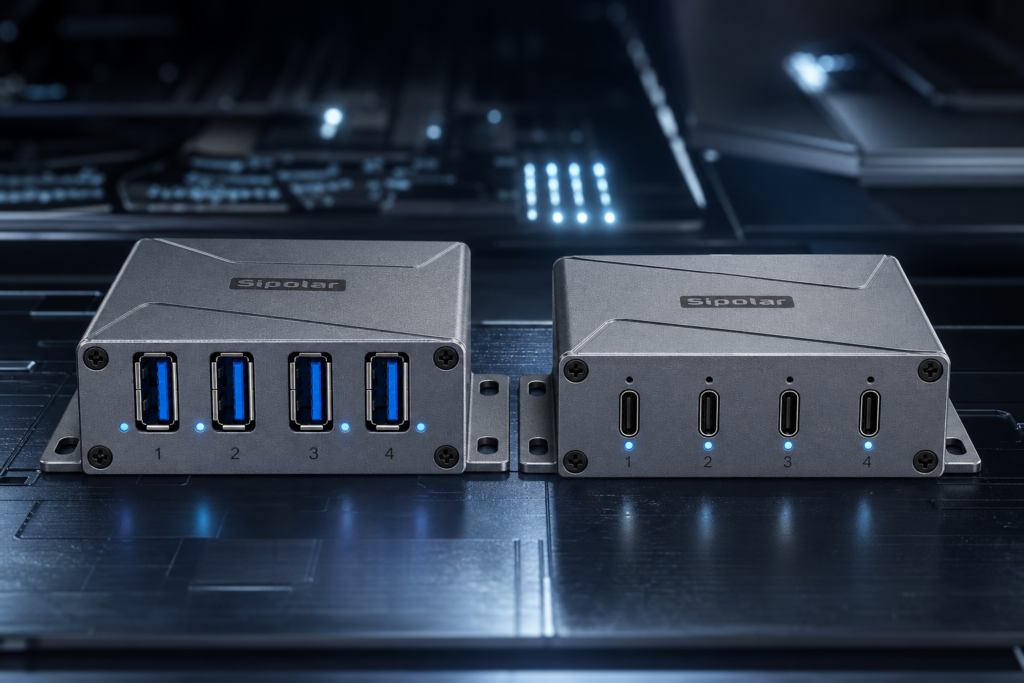
A Deep Dive into the Sipolar A-4A30M4 Aluminum 4-Port USB 3.0 Hub In automated equipment and harsh industrial environments, the stability and durability of a USB hub directly impact production efficiency. The Sipolar A-4A30M4, built with an aluminum alloy body and engineered for industrial scenarios, exemplifies the essential differences between industrial-grade and consumer-grade USB hubs. This article explores how this aluminum 4‑port USB 3.0 hub outperforms home‑use models in performance, construction, and longevity to meet the most demanding industrial requirements. Core Differences: Industrial vs. Consumer USB Hubs 1.Material: Aluminum for Durability and Heat Dissipation Consumer USB hubs are often made of plastic, which is prone to cracking and offers poor heat dissipation. The Sipolar A‑4A30M4 features a scratch‑resistant aluminum alloy shell that not only withstands tough conditions but also provides excellent thermal management, ensuring stable operation under high temperature and heavy loads. 2.Design & Workmanship: Built to Last The A‑4A30M4 sports a clean, rugged design with well‑spaced ports and gold‑plated metal connectors for enhanced signal integrity and longer service life. Its overall construction meets industrial standards, with vibration and electromagnetic interference resistance far superior to consumer‑grade products. 3.Power Supply & Stability: Independent Voltage Regulation Industrial‑grade hubs come with an external power adapter and built‑in voltage regulation chips, preventing device dropouts caused by current fluctuations. Consumer hubs typically draw power solely from the computer’s USB port, which often cannot supply enough current for multiple devices. Q&A: How does an aluminum housing affect USB hub performance? Aluminum not only increases mechanical strength but also significantly improves heat dissipation, preventing overheating that could compromise device stability. Two Sipolar Aluminum 4‑Port Hubs Compared Sipolar A‑4A30M4 (USB‑A 3.0) Aluminum body for superior protection and cooling Four USB 3.0 ports, up to 5 Gbps transfer speed Ideal for expanding industrial equipment – automation instruments, industrial printers, etc. Compact 4‑Port USB‑C 3.2 Model Minimalist aluminum design, square and portable USB 3.2 speeds up to 10 Gbps Perfect for high‑speed data acquisition, professional video capture Small footprint, easy to install in tight industrial spaces  Selection Guide: Which One Fits Your Industrial Environment? If you need stable power delivery to support multiple devices simultaneously, the A‑4A30M4 is the robust, reliable choice. For extreme transfer rates – large industrial data sets or high‑definition video – the USB‑C 3.2 model is your best bet. If space and aesthetics matter, the ultra‑compact USB‑C version can be easily hidden or mounted. Q&A: Can an industrial‑grade USB hub really boost productivity? By providing stable power and strong interference rejection, it reduces device disconnections and data packet loss, significantly cutting troubleshooting costs. Typical Applications & Customer Feedback An automation factory used the A‑4A30M4 to connect multiple industrial devices and saw device dropout rates drop by over 80%, greatly improving continuous assembly line efficiency. A video editing studio adopted the USB‑C 3.2 hub to ensure real‑time, low‑latency transmission of high‑resolution footage, meeting the demands of professional post‑production. Summary Aluminum construction, industrial‑grade design, and stable power delivery are the three pillars that set the Sipolar A‑4A30M4 and the USB‑C 3.2 hub apart in the industrial field. Choosing the right industrial‑grade USB hub is the key to ensuring long‑term, trouble‑free operation of your equipment. Is your production site experiencing issues due to inadequate hub performance? Feel free to reach out – let’s explore the best industrial connectivity solutions together.

Read More »